


Search Return:- User Can Search their returns on the basis of 4 search criterias.
Return Id:- User can search their return if he kknow return id of it. Act Type:- User can search his/her returns on the basis of Act Type. Return Period:- User can search his/her returns on the basis of Return period. Financial Year:- User can search his/her returns on the basis of Financial Year.
Benefits:-
User can direct search his/her return by using this search facility. User can Edit his/her return as they do it from browse page, after search. He can use any of the combination of 4 search criterias to find his/her return. User can find the Status here also.
How Search Return Works
1: Click on "Search Return " Button in side bar. You shall see this window.
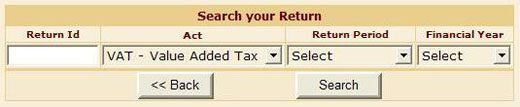
2: Select any of the search criteria - in Return Id,Act Type, Return Period, and Financial Year for you want to Search Return. After Selection Click Search. You will see the Deail of search.

3: User can edit his pending returns from here..
4: User can see status of their returns.