


1: Click on "File New Return " Button in side bar. You shall see Minimal Entry page.
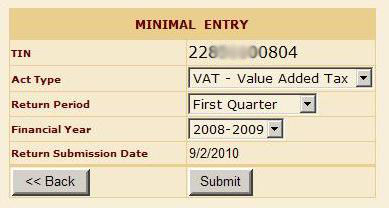
2: Select Act Type, Return Period, and Financial Year for you want to submit Return. After Selection Click Submit. Review Minimal Entry Page will Open.
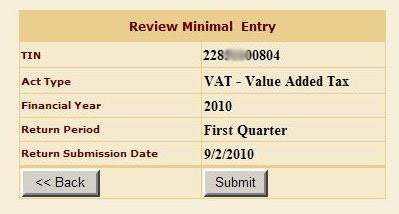
3: On reviewing minimal entry informtion Click Submit Button. You will see the message of successful Minimal Entry. Now You can Navigate to Browse Page by clicking link "Go to respective Return Browse Page" or You can navigate to Detail Entry page of respective Return Form by click on link "VAT Detail Entry"
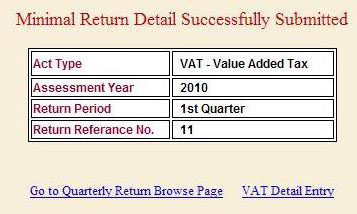
4: User will do Minimal Entry for Annual or Quarterly by same way. After complete the Minimal Entry, if user wish to do Detail Entry at that time user can navigate to respective Form directly.see the above image. or he can do Detail Entry later navigate from Browse Button.
5: To fill Detail Entry of Annual Return, User Click browse Annual Return. User can do deatail entry of his annual return, fill and upload sales/Purchase List, fill Challan details, finalize Return and see status of his/her return. See More about How to file Annual Return CLICK HERE
6: To fill Detail Entry of Quarterly Return, User Click browse Quarterly Return. User can do deatail entry of his Quarterly return, fill Challan details, finalize Return and see status of his/her return. See More about How to file Quarterly Return CLICK HERE